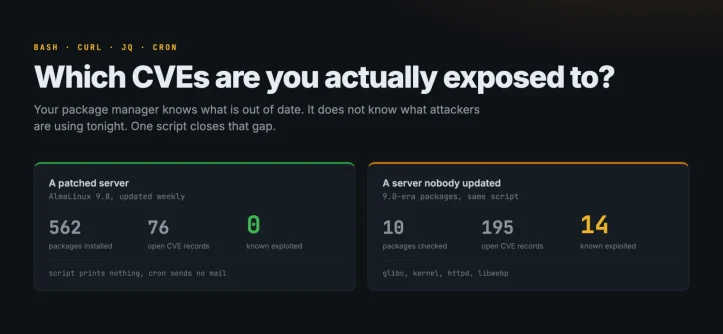
Your package manager knows what’s out of date. It doesn’t know what attackers are using tonight. A 70-line bash script and one cron line close the gap.
dnf check-update hands you 200 packages. apt list --upgradable does the same thing with different colors. Neither tells you which of those packages attackers are using to break into servers this week. And that’s the only part of the list you would act on at 2am.
The gap is easy to close, and it doesn’t need an agent, a license, or a scanner appliance. All you need is your installed package list, one free vulnerability API that understands your distro, and CISA’s catalog of vulnerabilities that are confirmed to be exploited in the wild. About 70 lines of bash and a single cron entry. That’s it.
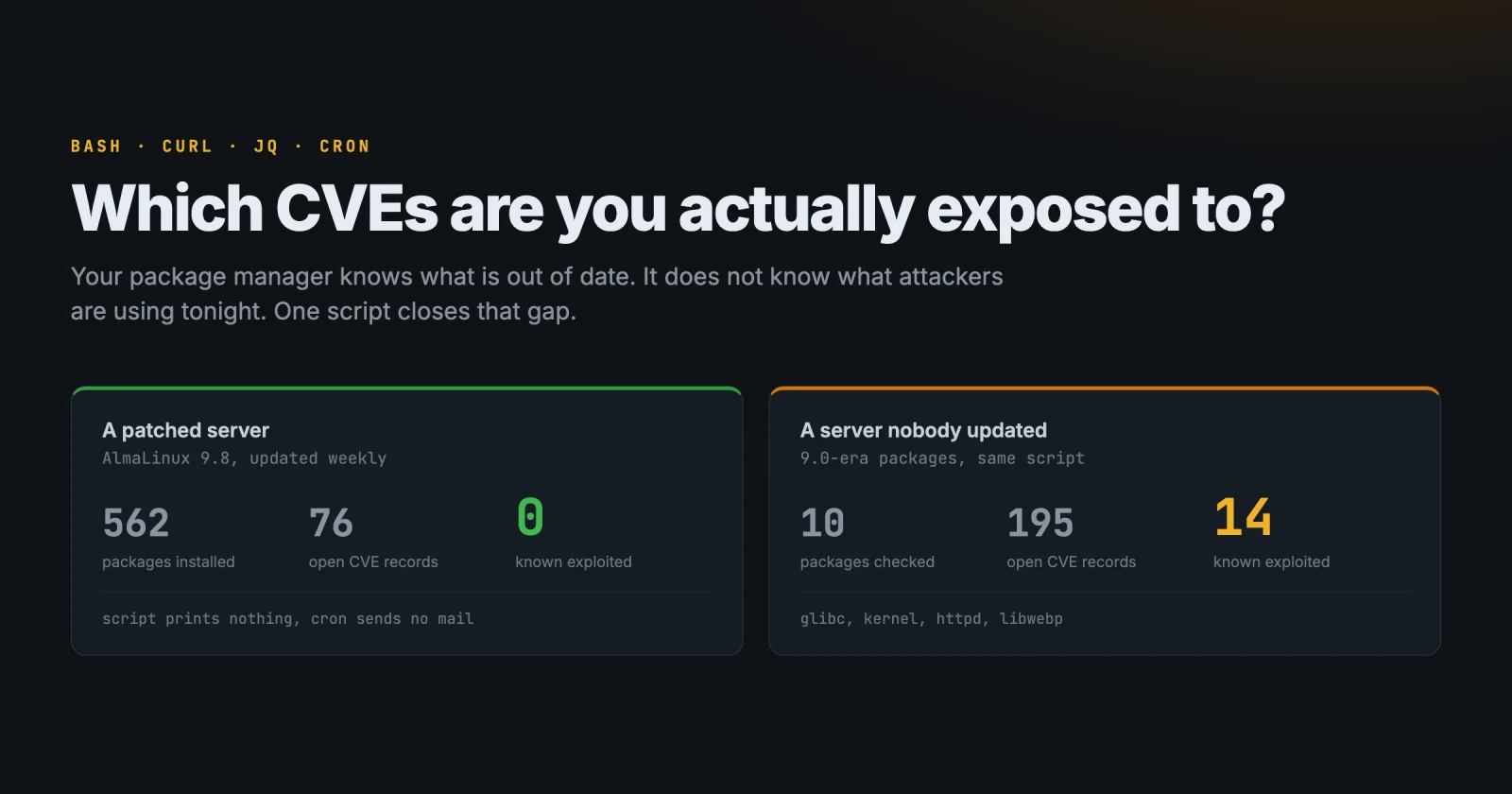
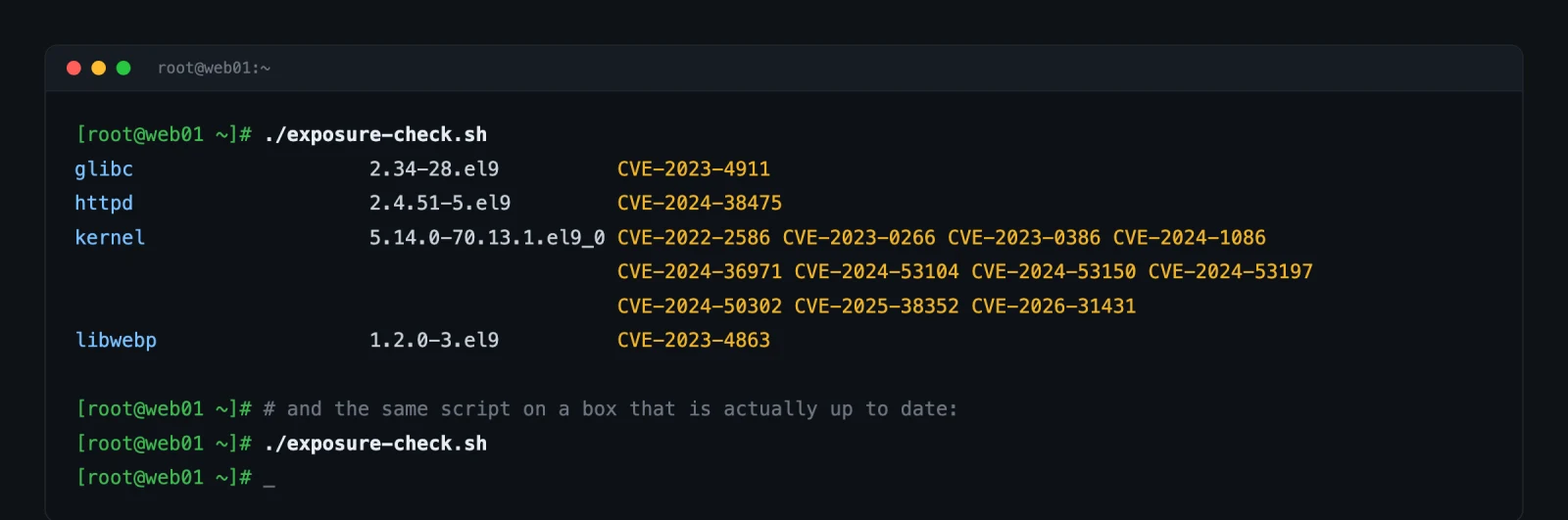
Here’s what it looks like on two AlmaLinux 9 boxes. The first is patched weekly: 562 installed packages, 76 open vulnerability records, and zero of them known to be exploited. The script prints nothing, cron mails nothing, you stay asleep. The second hasn’t been updated since 9.0 shipped. Same script, four packages, fourteen CVEs, and every single one of them is something attackers are actively using.
Why the CVE count on your server isn’t a work queue
Every Linux server has hundreds of open CVEs at any moment, and almost none of them will ever be used against you. Sorting the pile by CVSS score doesn’t fix that either. The score describes how bad the bug would be if someone exploited it, not whether anyone ever has.
CVE-2023-4911 is the example I keep coming back to. It’s a buffer overflow in the glibc dynamic loader, scored 7.8, which puts it below the 9.x flaws further up your report. It’s also a reliable local root on a default install, public exploit code appeared within days, and it sits in CISA’s exploited catalog. The 9.8 remote code execution in a library nothing on your box actually loads? Not the one to lose sleep over.
CISA’s Known Exploited Vulnerabilities catalog is the useful filter here. It’s a curated list of CVEs with evidence of exploitation in the wild: 1,694 entries at the time of writing, against roughly 300,000 published CVEs. That ratio is the whole point. It turns “you have vulnerabilities” into a list you can finish before lunch.
Don’t compare version strings against upstream
The obvious way to build this is to grab your package versions, look each one up in a CVE database, and compare. That approach produces confident, wrong answers on every enterprise distro, because of backporting.
Debian 12 ships openssl 3.0.11-1~deb12u1. Upstream fixed a pile of things in 3.0.12, 3.0.13 and later. Debian didn’t move to those versions; it patched the fixes into its own 3.0.11 package and left the version number alone. A naive scanner sees 3.0.11 and flags everything fixed after it. Your box is fine. You spend Thursday proving it.
The fix is to ask a database that stores distro-specific records, so “fixed” means fixed in your distro’s package. OSV does exactly that. It carries separate ecosystems for Debian:12, Ubuntu:22.04, AlmaLinux:9, Rocky Linux:9 and more, the API is free, and there’s no key to manage.
The four steps
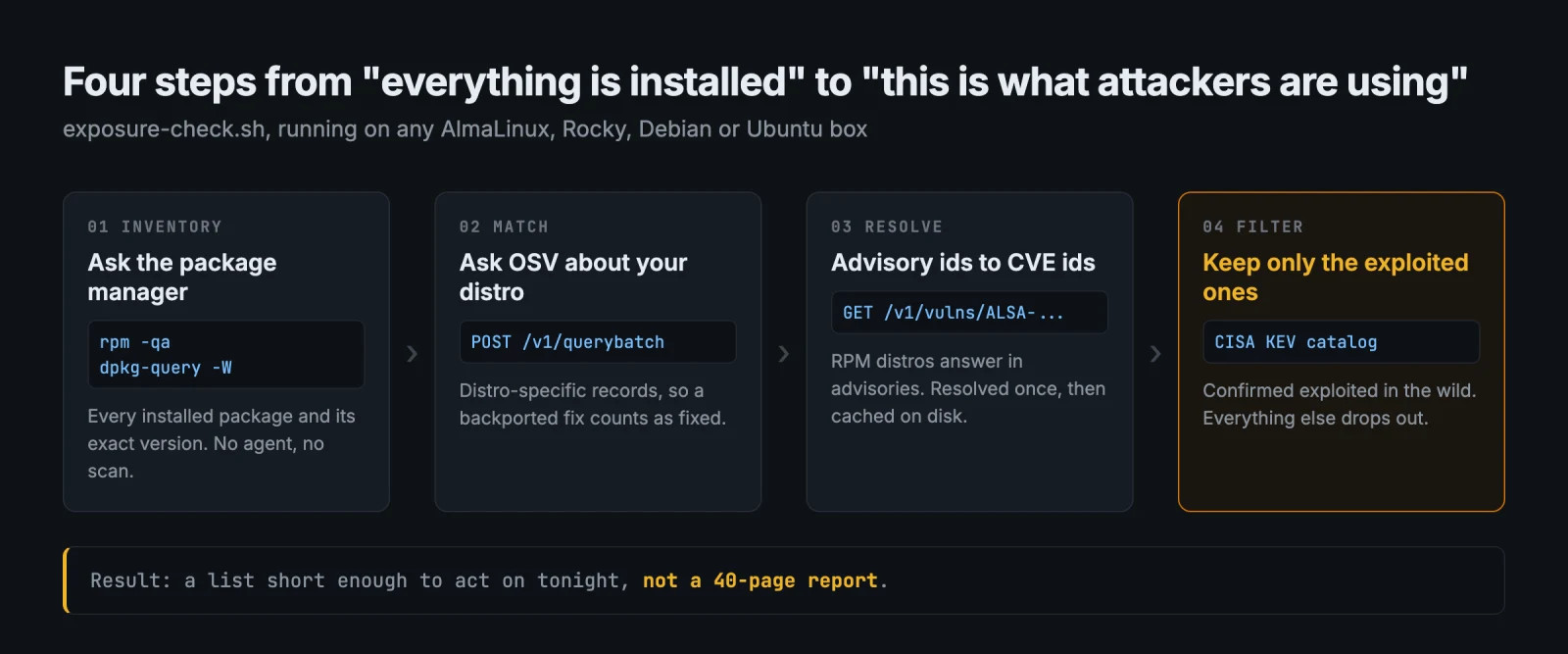
Step one is rpm -qa or dpkg-query -W. Step two posts the whole list to OSV’s querybatch endpoint, which takes up to a thousand package-and-version pairs per request and answers in the order it received them. A couple of requests cover a whole server.
Step three exists because RPM distros answer in advisories, not CVEs. Ask about a vulnerable glibc on AlmaLinux and you get back something like ALSA-2023:5453, Alma’s rebuild of a Red Hat erratum, which bundles several CVEs into one id. Each advisory has to be looked up once to learn which CVEs it covers. Debian and Ubuntu are kinder: their ids are literally DEBIAN-CVE-2023-44487, so a regex is enough.
Those advisory lookups are the only slow part, so the script caches them in ~/.cache/osv-advisories.tsv and only resolves ids it has never seen. The first run on a neglected box takes a few minutes. Every run after that takes seconds, because an advisory’s CVE list never changes.
Step four intersects the result with the KEV catalog and prints whatever survives.
The script
Here’s the full script. It’s read-only, it needs nothing but bash, curl and jq, and you can read every line before you run it:
#!/usr/bin/env bash
# exposure-check.sh - which installed packages carry a CVE that is known to be
# exploited in the wild (CISA KEV)? Read-only. Needs bash, curl, jq.
set -euo pipefail

OSV=https://api.osv.dev/v1
KEV=https://raw.githubusercontent.com/cisagov/kev-data/main/known_exploited_vulnerabilities.json
tmp=$(mktemp -d); trap 'rm -rf "$tmp"' EXIT

# 1. which OSV ecosystem is this box?
. /etc/os-release
case "$ID" in
  almalinux) eco="AlmaLinux:${VERSION_ID%%.*}" ;;
  rocky)     eco="Rocky Linux:${VERSION_ID%%.*}" ;;
  debian)    eco="Debian:${VERSION_ID%%.*}" ;;
  ubuntu)    eco="Ubuntu:${VERSION_ID}" ;;
  *) echo "no OSV ecosystem for ID=$ID" >&2; exit 1 ;;
esac

# 2. installed packages as tab-separated name and version
if command -v rpm >/dev/null 2>&1; then
  rpm -qa --qf '%{NAME}\t%{EVR}\n'
else
  dpkg-query -W -f '${Package}\t${Version}\n'
fi | sort -u > "$tmp/pkgs"

# 3. ask OSV about all of them, 400 per request
split -l 400 "$tmp/pkgs" "$tmp/chunk."
for chunk in "$tmp"/chunk.*; do
  jq -Rn --arg eco "$eco" \
    '{queries: [inputs | split("\t") | {package: {name: .[0], ecosystem: $eco}, version: .[1]}]}' \
    < "$chunk" > "$chunk.req"

  curl -fsS -m 60 --retry 3 --retry-all-errors -X POST -d @"$chunk.req" "$OSV/querybatch" > "$chunk.json"

  if jq -e '[.results[] | .next_page_token? // empty] | length > 0' "$chunk.json" >/dev/null; then
    echo "OSV paginated a batch result; refusing an incomplete scan" >&2
    exit 1
  fi

  jq -r '.results[] | (.vulns // []) | map(.id) | join(",")' "$chunk.json" > "$chunk.res"
  paste "$chunk" "$chunk.res" >> "$tmp/hits"
done

# 4. RPM distros answer with advisory ids (ALSA-2026:1234), not CVE ids.
#    Resolve each unknown one once and cache it.
cache=${XDG_CACHE_HOME:-$HOME/.cache}/osv-advisories.tsv
mkdir -p "$(dirname "$cache")"; touch "$cache"

awk -F'\t' '$3 != "" { n = split($3, a, ","); for (i = 1; i <= n; i++) print a[i] }' "$tmp/hits" \
  | { grep -v 'CVE-[0-9]' || true; } | sort -u > "$tmp/advisory-ids"
cut -f1 "$cache" | sort -u > "$tmp/cached-ids"
comm -23 "$tmp/advisory-ids" "$tmp/cached-ids" > "$tmp/todo"

resolve() {
  curl -fsS -m 20 --retry 3 --retry-all-errors "$OSV/vulns/$1" \
    | jq -r --arg id "$1" '[.aliases[]?, .related[]?] | map(select(test("^CVE-"))) | .[] | "\($id)\t\(.)"' 2>/dev/null || true
}
export -f resolve; export OSV
xargs -P 12 -I{} bash -c 'resolve "$@"' _ {} < "$tmp/todo" >> "$cache"

# 5. the CVEs attackers are actually using
curl -fsS -m 60 --retry 3 --retry-all-errors "$KEV" | jq -r '.vulnerabilities[].cveID' | sort -u > "$tmp/kev"
[ "$(wc -l < "$tmp/kev")" -gt 500 ] || { echo "KEV catalog looks empty, refusing to report a clean box" >&2; exit 1; }

# 6. join: package -> its CVEs -> only the exploited ones
awk -F'\t' -v kevfile="$tmp/kev" -v mapfile="$cache" '
  FILENAME == kevfile { kev[$1] = 1; next }
  FILENAME == mapfile { cve[$1] = cve[$1] " " $2; next }
  $3 != "" {
    hits = ""
    n = split($3, ids, ",")
    for (i = 1; i <= n; i++) {
      id = ids[i]; list = ""
      if (match(id, /CVE-[0-9]+-[0-9]+/)) list = substr(id, RSTART, RLENGTH)
      else if (id in cve) list = cve[id]
      m = split(list, cs, " ")
      for (j = 1; j <= m; j++)
        if (cs[j] in kev && !seen[$1 SUBSEP cs[j]]++) hits = hits " " cs[j]
    }
    if (hits != "") printf "%-24s %-20s%s\n", $1, $2, hits
  }
' "$tmp/kev" "$cache" "$tmp/hits" | sort
Four things in there are worth pointing out, because each one prevents a quiet failure or cost me a debugging session.
Fetch KEV from CISA’s GitHub mirror, not from cisa.gov. The canonical feed under www.cisa.gov/sites/default/files/feeds/ returns 403 Access Denied to plenty of hosting IP ranges, including two of mine. It’s not a user-agent problem; changing the UA doesn’t help. CISA publishes the identical file in its own cisagov/kev-data repository on GitHub, same catalog version, same 1,694 entries, and raw.githubusercontent.com answers from anywhere.
Don’t let a broken feed bless the box. A security script that reports “nothing to worry about” because its threat feed returned an error page is worse than no script at all. If the catalog comes back with fewer than 500 CVEs, the download is broken and the script exits non-zero instead of declaring the box clean.
Don’t silently accept a partial OSV response. The batch API can paginate unusually large result sets. This script deliberately doesn’t pretend a partial response is complete: if OSV returns a next-page token, it exits non-zero instead of potentially reporting a clean box with vulnerability records missing.
Don’t let one bad advisory lookup kill the run. A malformed response from one advisory shouldn’t stop the other results from being evaluated. The || true inside resolve is deliberate: a failed lookup is never written to the cache, so the next run retries it.
Put it in cron and forget about it
17 4 * * * /usr/local/sbin/exposure-check.sh
No output means no mail. You hear from this script only on the morning something you’ve installed turns up on the exploited list. That’s the correct amount of attention to pay it.
For a handful of boxes, keep the script in one place and let each host report for itself:
for h in web01 web02 db01; do
  ssh "$h" 'bash -s' < exposure-check.sh | sed "s/^/$h /"
done
One note on reading the output: rpm -qa lists every kernel still installed, not only the running one. An ancient kernel in the results usually means it’s still on disk and still in the boot menu, which is worth knowing. Check uname -r before you panic, then clean up with dnf remove --oldinstallonly. You’ll thank yourself later.
What this doesn’t catch
The blind spots matter more than the script, because the blind spots are where hosting boxes actually get hit.
- Anything the package manager didn’t install. An nginx you compiled, a vendor tarball in
/opt, a Java jar,node_modules, a Python virtualenv. Ifrpmordpkgdoesn’t know about it, neither does this script. - Control-panel packages. cPanel, Plesk and DirectAdmin ship their own RPMs from their own repositories, and those aren’t in OSV’s distro ecosystems. Their own update channels stay the source of truth.
- Application code. WordPress core, themes and plugins are where a shared-hosting box realistically gets compromised, and they need a completely different feed.
- Containers. The host package list says nothing about what’s inside your images. Run the script in the build, against the image.
- Whether anything already happened. This tells you what’s exposed. It can’t tell you whether someone walked through the door last Tuesday.
Four questions, four different tools
| The question | What answers it |
|---|---|
| What is out of date? | dnf check-update, apt list --upgradable |
| Which CVEs affect my packages, allowing for backports? | OSV, or your distro’s security tracker |
| Which of those are attackers actually using? | CISA KEV, which is what this script adds |
| Is someone inside the box right now? | Log monitoring and file integrity monitoring |
That last row is where a nightly script runs out of road. It answers one question, once a night, per box, about what the package manager can see. It keeps no history, it doesn’t track which host you fixed and which one you forgot, and it isn’t watching while you sleep. Answering the same exposure question continuously across a fleet, with each CVE tied to the hosts it affects and the version that fixes it, is a monitoring job rather than a cron job. That’s the point where you look at a managed platform instead. Suriq, for example, runs managed Wazuh deployments that keep the package inventory, the CVE mapping and the log monitoring going, on servers that stay yours.
Until then: the script is 70 lines and costs nothing. Start there.
Questions people ask about this
Is the OSV API free to use?
Yes. OSV is an open vulnerability database from Google, built on the OpenSSF’s OSV schema, with no API key and no registration. The batch endpoint accepts up to 1,000 package queries per request, which covers most servers in one or two calls.
Why filter on CISA KEV instead of CVSS severity?
CVSS estimates how bad a flaw would be if exploited. KEV records that exploitation has actually been observed. Filtering by KEV cuts hundreds of theoretical CVEs down to the few attackers are known to use. That’s a list you can finish today.
Does it work on CentOS 7 or RHEL?
Not as written. OSV carries AlmaLinux, Rocky Linux, Debian and Ubuntu ecosystems, and the case statement maps those four. CentOS 7 is end of life and has no OSV ecosystem, so a migration matters more than a scan there.
How long does the first run take?
A few minutes on a server with many unpatched advisories, because every unseen advisory id needs one API lookup. The results are cached on disk, so later runs finish in seconds and only look up advisories that are new.
Tags: wazuh
Leave a Reply